Enjoy Millions of the Latest Android Apps, Games, Music, Movies, TV, Books, Magazines & More. Anytime, Anywhere, Across Your Devices.
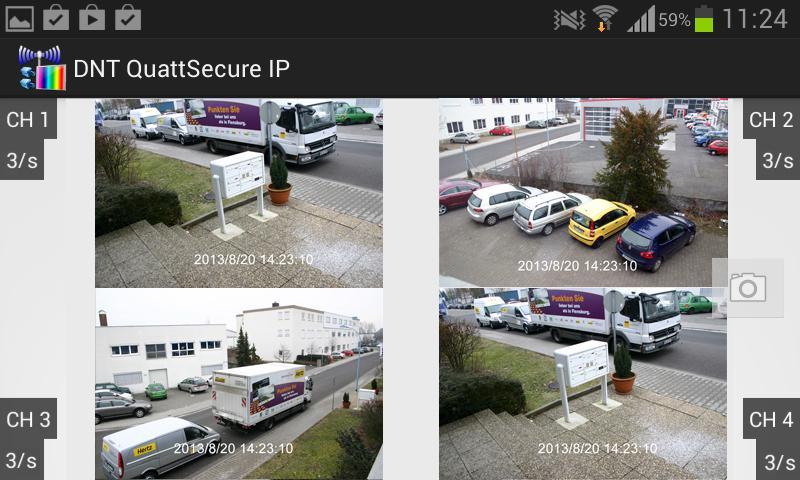
See what happens at home by smartphone: live from anywhere and at any time!
With the Quattsecure IP app you can monitor your property directly from the smartphone - and
Are informed immediately at the alarm! You can view up to 4 cameras on the smartphone at the same time.
Notes:
- For operation you need the QuatSecure-IP set from DNT.
- Connect the system to your network, follow the information in the operating instructions (area: network)
- Important: It is necessary to activate the UPNP function in the settings of your router.
- Start the app and call the "Settings" item, create a new connection there with "New".
- Enter a name for your network.
- Enter the ID number of your network now, this number can be found in the network information on the monitor or simply scan the QR code shown there.
- If you have already given a password in the network settings of your monitor, please enter this again here.
- With "Add New" they complete the settings.
- Now press the network name in the list to get to the camera view.
- In the camera view, press the arrow key to start playback.
- If the connection is successful, the camera image is now displayed.
- You can hide individual camera images by tapping shortly afterwards.
- You can create snapshot shot from the cameras. To do this, press the camera symbol in the view
- To adapt the network settings (modify) or to remove (Delete), press the network name in the "Settings" and hold it down.
- With "Notification Push Setting" you set up the alarm notification function. Further settings on the QuatSecure-IP monitor are also necessary for this.
- If the facility is successful, you will receive a notification with the time and the camera that triggered the alarm in the event of an alarm.
Read more